Example AI & Automations

Interactive demos · Fictional business

Try three workflows for Seagrape Tech Services. Choose one below, follow the instructions, and see how a voice note or business records become updates and next steps.

Fictional business records. Nothing is sent or connected to real accounts.

Finish the job. Let the paperwork follow.

Play the sample audio, then choose Update client file. Follow the note into a client update, supply task, follow-up and email draft.

Sample audio
Turn the note into follow-through

Your only inputA quick voice note.

Transcription
Finished Alex’s Wi-Fi setup. Need a USB adapter. Follow up Friday.

Transcribed for youAutomatically, from the audio.

Client file

Alex Morgan

Fictional client

Contact
[email protected]
(772) 555-0142
Address
123 Sample Lane
Vero Beach, FL 32960
Status
Wi-Fi setup completed
Note
Order a USB adapter.
Follow-up

Client file updatedThe details land here.

Supply task

Order a USB adapter for Alex.

Follow-up

Check in with Alex on Friday, October 23.

Email draft

Hi Alex, your Wi-Fi setup is complete. I’ll order the USB adapter and check in with you on Friday.

Next steps generatedFrom that same voice note.

Play the sample voice note, then choose Update client file.

Know what needs you today.

Choose Show my priorities. See sample messages, jobs and calendar details pass through a review and become three next steps.

Find the business priorities

Messages checkedUnanswered quotes and promises.

Messages

Maya’s quote has no reply. Jordan promised gate details by text.

Jobs checkedFinished work, open follow-through.

Jobs

Alex’s Wi-Fi setup is complete. The USB adapter is still needed.

Dates checkedVisits and missing details.

Calendar

Jordan’s printer setup is Friday at 10 a.m.

Cross-referenced for youPeople, jobs and dates matched.

AI agent review

Connect the details. Find what needs you.

Match people and jobs, cross-check dates and messages, then identify the next steps.

Priorities, pulled togetherFrom the connected records.

  1. Follow up on Maya’s quote

    The quote email has no reply in the sample.

  2. Order the USB adapter for Alex

    The Wi-Fi job is complete; the adapter is the remaining supply task.

  3. Confirm access for Jordan’s visit

    Friday’s calendar entry needs the gate details promised by text.

Choose Show my priorities to see what needs attention.

Tell the team once. Keep the board current.

Play the sample audio, then choose Update team board. See the board update, with a daily checklist, delivery log and supply task below.

Sample audio
Turn the team note into updates

Your only inputA quick voice note.

Transcription
Opening checks are done. Equipment check is done. Delivery arrived. Need more printer paper.

Transcribed for youAutomatically, from the audio.

Team board

Seagrape Tech Services

Wednesday, October 21, 2026 · fictional business

Opening checks
Complete
Equipment check
Complete
Delivery
Arrived
Printer paper
Low

Team board updatedThe details land here.

Daily checklist

Opening and equipment checks are complete.

Delivery log

One delivery received on October 21, 2026.

Supply task

Restock printer paper.

Next steps generatedFrom that same voice note.

Play the sample voice note, then choose Update team board.

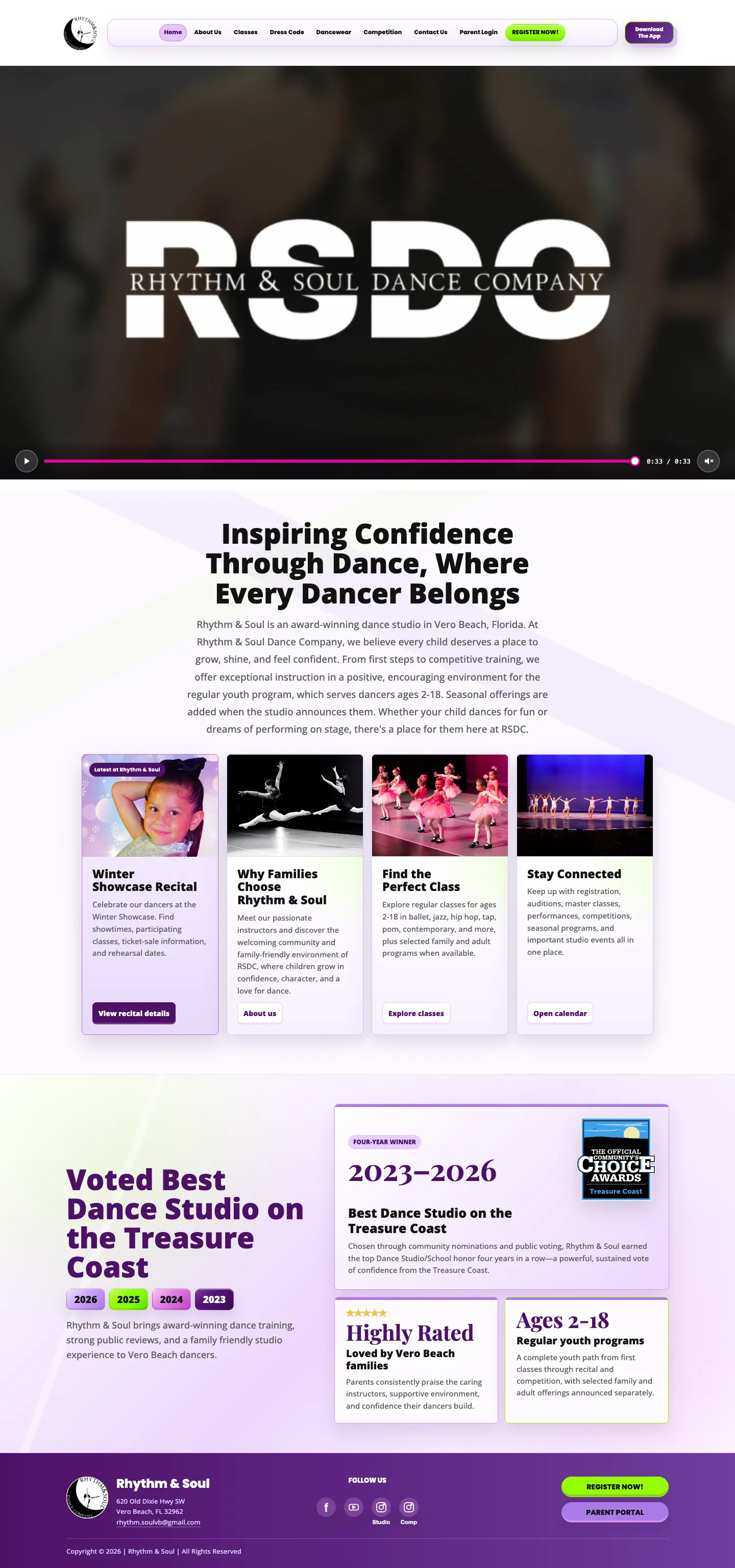
A closer look at a local website I built.

Published website

Rhythm & Soul Dance Co.

Dance studio · Vero Beach

A rebuilt home for the studio. Compare the original and finished homepage, then take a closer look at the published website.

  • A clearer introduction. A studio overview now introduces the programs before families choose where to go next.
  • Phone layouts that fit. Text and cards are sized and arranged for smaller screens.
  • Studio dates together. A dedicated calendar brings class dates, events, and closures into one view.
Open live site (opens in a new tab)

Start with a conversation.

Free 15-minute phone consultation. I’ll call you at your chosen time.

Book Consult

Questions before booking? Email CJ. Meet CJ.

FAQ.

What kinds of business technology do you help with?

I can help with websites, online profiles, social media, ongoing management, everyday technology, and practical AI tools and automations. The consultation helps determine a useful, realistic scope.

Do I need to know exactly what service I need?

No. Tell me what you want to improve or what is getting in the way. I will help you identify the simplest useful next step during the free consultation.

Can you work with my current systems and accounts?

Often, yes. I review the relevant tools, platforms, access, and goals before recommending whether to improve what is there or move to a simpler setup. Your accounts and billing stay in your business's name whenever possible. Please never send passwords by email, text, or form.

Do you take on one-time projects and ongoing support?

Yes. Some businesses need one focused improvement or troubleshooting project. Others benefit from ongoing website, online-profile, and social-media management. We can decide what makes sense after the consultation, with a clear scope and quote before work begins.

Will you make changes without my approval?

No. I explain the recommendation, confirm the scope, and get your approval before making important changes to accounts, systems, or public content.

Can you help when several tools need to work together?

Yes. We can look at how your devices, software, accounts, customer contact paths, and online tools fit together, then choose the simplest useful place to start.

For home and family

Need technology help at home?

I help Vero Beach homes with patient, in-home support for Wi-Fi, printers, computers, phones, passwords, photos, and online safety. Start with a Tech Tune-Up.

Explore Personal Support